
BundleHound support
Three ways to an answer, in the order worth trying:
- Documentation: how to do anything in BundleHound, with pictures.
- Common questions: short answers, below.
- Write to support: the form at the bottom of this page.
Common questions#
About BundleHound
What is a bundle identifier?
The reverse-DNS name macOS uses to tell one app from another, such as com.apple.Safari. It
normally stays the same when an app is renamed or updated, which is why window managers, MDM
profiles, defaults commands and launch agents all use it. More in
What BundleHound does.
AeroSpace already lists bundle IDs. Why BundleHound?
aerospace list-apps prints the IDs of the apps that are running, in Terminal, and that’s a
fine way to get one. BundleHound shows every app, running or installed, in a window you can
search, and copies the finished AeroSpace rule for one app or several. More in
Copy as Format.
Which formats can it copy?
AeroSpace, Hammerspoon, Finicky, Rectangle, BetterTouchTool, AppleScript, Swift, open -b,
defaults read and more are built in. Settings ▸ Snippets lets you write your own, with
{bundleID} standing for the identifier; the editor shows the result as you type. Export saves
the list, or the selected rows, as plain text, CSV or JSON. More in
Copying and exporting.
The list
Does it list every app?
Every app that is running, always. Installed apps are found in /Applications,
/System/Applications and /Library. An app in the Applications folder inside your home
folder shows only while it runs, because the Mac App Store sandbox keeps BundleHound out of
your home folder. More in What BundleHound does.
An app I expect isn’t in the list.
Usually a setting is hiding it: Running Apps Only (on at first), the short list (All Rows shows every row), the kinds in Settings ▸ Filters, or an exclusion. An app in ~/Applications shows only while it is running, because the Mac App Store sandbox keeps BundleHound out of your home folder. The checklist, in order: When an app is missing.
What do Category and Kind mean?
Category is the App Store category the app declares for itself; a blank means it declares none. Kind says how the app runs: a regular app, a menu-bar app, a background app, or System, code that runs for the whole Mac. More in Reading the list.
What does the red warning triangle mean?
The app’s files no longer match its code signature, so something changed them after the developer signed the app. It is sometimes an innocent patch and sometimes worth a look. The red toolbar button lists only those apps. More in Tamper warning.
Where did BundleHound go?
It lives in the menu bar, the Dock, or both: click either icon to bring the list back. One of the two always stays on. More in Where BundleHound lives.
Does closing the window quit it?
No. Quit from the menu-bar icon’s right-click menu, or press ⌘Q while BundleHound is the active app. More in Where BundleHound lives.
Privacy and internet access
Why is the App Store section empty for an app?
Only apps installed from the App Store have a store record, and BundleHound asks Apple about them only while internet access is on. The details can also take a moment to arrive, or Apple may not have answered. More in App Store details.
What does BundleHound send, and to whom?
Nothing, unless you allow internet access. Then it asks Apple’s App Store about the apps you installed from it, and nothing goes to chrisgve. The full list of what is sent: Internet access.
What does BundleHound keep on my Mac, and how do I remove it?
The privacy policy lists it. To remove everything, quit BundleHound, delete the app, and delete the folder ~/Library/ (in Finder, Go ▸ Go to Folder, then paste the path).
Does it change my apps?
No, it only reads them. Apart from its own settings, the only file it writes is one you choose in the Export save panel. More in What BundleHound does.
Requirements
What does it need?
macOS 15 Sequoia or later, on an Intel or Apple silicon Mac.
Does it need any permissions?
No. The Mac App Store build asks for no Accessibility, Automation or Full Disk Access permission. Its only first-launch question is whether it may connect to the App Store. More in Install and first launch.
Miscellaneous
Is there a trial?
No. BundleHound is a single purchase on the Mac App Store: no subscription, no in-app purchases.
How do I get a refund?
BundleHound is bought through the Mac App Store, so Apple handles purchases, billing and refunds. Go to reportaproblem.apple.com, sign in, and choose the purchase. Apple decides each request. Support can’t see your purchase, can’t issue a refund, and can’t change what Apple decides.
Where is my receipt?
Apple sends it by email after the purchase, and your purchase history is in the App Store app under your account. Support has no access to purchases.
Who answers support messages?
Replies may be drafted by an AI assistant, which says so in the reply. It can answer questions, walk you through a step, and log a bug or a feature request properly. Anything it can’t settle goes to the person who makes BundleHound, and it tells you when that happens. It won’t promise dates for fixes or features.
What is in the privacy policy and terms?
What BundleHound reads and stores on your Mac, the one optional connection to Apple, and the terms you use it under: Privacy and terms.
Before you write#
For a bug, say what you did, what you expected and what happened, and add a screenshot if it shows the problem. If an exported list would help, support will ask for it in the reply; it contains every app on your Mac, so trim it to the relevant rows first.
The quickest way to write about a bug: in BundleHound, choose Help ▸ Report a Problem…: it opens this form with BundleHound’s version, your macOS version and your Mac type already filled in. Nothing is sent until you press Send.
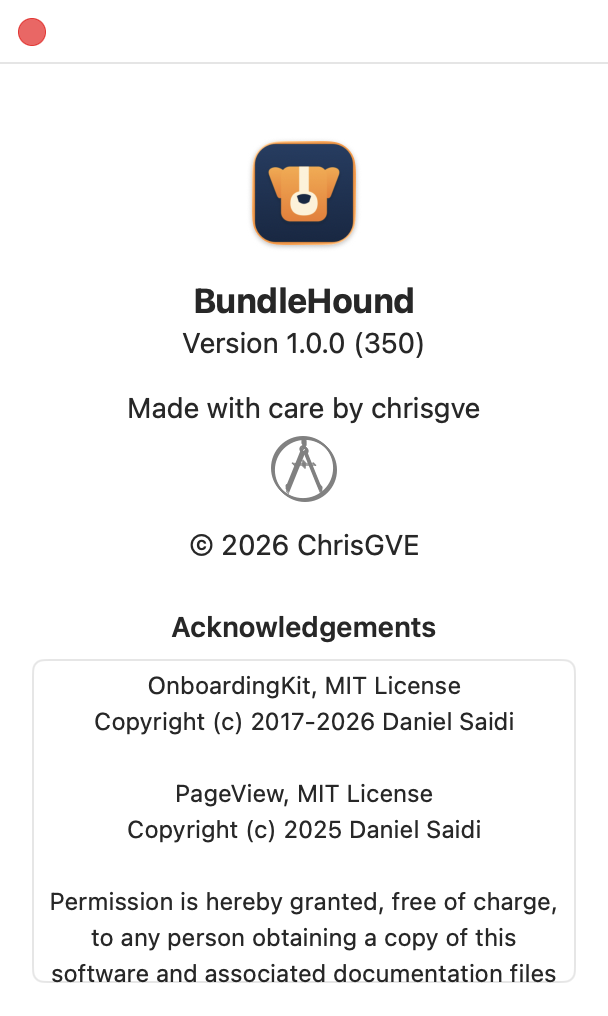
Your BundleHound version is in About BundleHound.
- 1: the version line
To find the versions yourself: About BundleHound (in the app menu, or the menu-bar icon’s right-click menu) shows BundleHound’s version 1. Your macOS version is in Apple menu ▸ About This Mac.
Still have a question?
Pick what it's about, and the message reaches support marked as BundleHound.
Message sent. A reply, if one is due, comes by email to the address you gave.